
Table of Contents
The Waiting Is the Hardest Part
You did everything right. You took the class, you passed the written test, you qualified at the range, you got fingerprinted, you paid the fee, and you hit submit. Then nothing. Days go by. Then a couple of weeks. The mailbox stays empty and your phone stays quiet, and after a while a small voice starts asking whether something went wrong.
Almost always, nothing has gone wrong. A quiet application is usually a normal application. But you do not have to sit there guessing, because Texas gives you a place to look.
This page shows you where to check your Texas LTC application status, what the wait is supposed to look like under state law, what actually causes an application to sit still, and what to do if yours seems stuck. It is general education, not legal advice about your situation. Only Texas DPS can act on your application, and only a Texas attorney can advise you about your own record.
Quick Answer: Where to Check Your Texas LTC Application Status
Check your status in the official DPS Licensing portal:
https://txapps.texas.gov/txapp/txdps/ltc/
- Returning users log in with the phone number or email address tied to the application or license.
- New applicants need a valid Texas driver license or ID card number plus a date of birth.
- The portal shows where your application currently sits in the process.
- It also shows a checklist of anything still needed from you. Read that checklist. It is the single most useful thing on the screen.
- If you need a person, DPS Regulatory Services can be reached at (512) 424-7293. DPS also runs a secure document upload service and a secure email inquiry form.
That is the practical answer. The rest of this page explains what you are actually looking at and how to think about the timeline.
What the Portal Is
The DPS Licensing portal is the front door for nearly everything to do with a Texas License to Carry. It is not a status page bolted onto a paper process. It is the system itself.
From that one login you can:
- Submit an original license application
- Apply for instructor certification
- Renew an existing license
- Change your address
- Report a license lost or stolen
- Check your application status
- Update an At-Risk status designation
If you have not used it since you first applied, this is the same portal. Your login has not changed. And because so much lives in one place, it is worth bookmarking it now rather than searching for it every time. Later on you will use it again for renewal, and for address or name changes.
How to Log In
Logging in trips people up more often than it should, usually because of a mismatch between what you used at application time and what you are typing now.
If you already have an application or a license on file, you sign in with the phone number or the email address tied to that record. Not necessarily your current favorite email. The one on the application. If you have changed phone numbers or email addresses since you applied, try the old one first.
If you are creating an account as a new applicant, you will need a valid Texas driver license or ID card along with your date of birth. Those have to match state records exactly, which means the name and date on file, not a nickname or a typo.
If the login simply will not take, do not keep hammering it. Call DPS Regulatory Services at (512) 424-7293 and let a person sort out the record.
What the Status Screen Actually Tells You
The portal shows you where your application currently sits in the DPS process. That is the honest description, and it is deliberately the one we are using.
We are not going to tell you which words you will see on the screen, because status wording changes and we are not in the business of guessing on your behalf. What matters is not the exact phrase. What matters is whether the screen is asking anything of you.
So read the screen with one question in mind: is DPS waiting on me?
If the answer is no, your file is moving through the state's process and your job is patience.
If the answer is yes, your job is to supply whatever is being asked for, quickly and completely. That is the difference between an application that finishes and one that sits.
Read the Checklist. Then Read It Again.
The portal gives applicants one specific instruction that deserves to be quoted, because it explains most of the delays people experience:
"After you have submitted your application, carefully review the checklist for any additional documentation which may be required to complete your application."
Missing supporting documents are the most common self-inflicted delay in the entire Texas LTC process. Not fraud. Not disqualification. Not some mysterious backlog. Just a document that was requested and never uploaded, sitting on a checklist that nobody went back and read.
This is easy to do. You submit the application, you feel finished, you close the browser, and you assume the ball is in the state's court. Sometimes it is not.
Go back into the portal a few days after you submit and look at the checklist deliberately. If it names a document, get that document and upload it. DPS runs a secure document upload service for exactly this purpose.
The 60-Day Clock, and the Word That Matters
Texas puts a clock on DPS. Here is how it actually works.
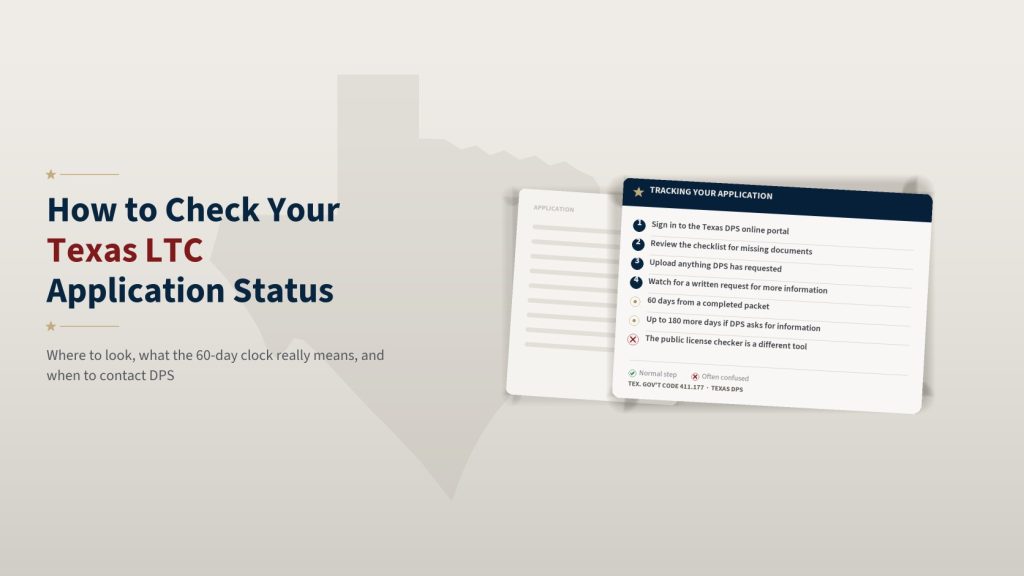
DPS issues a license within 60 days of receiving a completed application packet. If DPS requests further information, it gets an additional 180 days to complete the review. And if the applicant does not respond in time to that request, the application terminates.
Read the word completed carefully, because it does an enormous amount of work in that sentence.
The 60 days does not begin the moment you press submit. It begins when DPS has a complete packet in hand. If a piece is missing, the packet is not complete, and the clock people mentally started on submission day was never actually running.
This single point explains most of the frustration we hear. Someone counts sixty days from the day they applied, gets to day sixty-one, and concludes the state lost their file. In reality there was a document request they never saw, and the packet was never complete to begin with.
We should also say plainly what we are not saying. We are not predicting how long your application will take. Nobody outside DPS can do that honestly. What we can tell you is what the law requires of DPS once your packet is complete. If you want a fuller picture of the overall timeline from class to card, we lay it out in how long it takes to get a Texas LTC.
When DPS Asks You for More Information
A request for more information is not a rejection. It is not a warning sign. It is a routine part of a background review, and most people who get one are approved.
What it is, however, is time sensitive. The statute gives DPS extra time when it makes a request, and it also provides that the application terminates if the applicant does not respond in time. That is the part to take seriously. An application that dies from silence is the worst possible outcome, because it is entirely preventable and it costs you the whole process.
So when DPS asks:
- Respond promptly. Do not let it sit on the kitchen counter.
- Send exactly what was asked for. Not a substitute, not an explanation instead of the document.
- Use the secure upload service rather than improvising a delivery method.
- Keep a copy of what you sent and the date you sent it.
If the request touches something legally complicated in your background, that is the moment to talk to a Texas attorney rather than to draft your own explanation. Our page on what disqualifies you from a Texas LTC explains the general categories Texas law lists, but general categories are not a substitute for advice about your actual record.
Normal Reasons an Application Sits Still
Most stalled applications have an ordinary explanation. Here are the common ones.
- A supporting document was never uploaded. The single most frequent cause. Check the checklist.
- Fingerprints have not been matched yet. Prints move through their own process, and a delay there is not about you personally.
- A court record has to be obtained from a county. If anything in your history requires paperwork from a county clerk, DPS has to wait on that county. Speed varies enormously from county to county, and none of it is in your control.
- DPS requested more information and is waiting on you. Which loops back to the first point on this list.
Notice what is not on that list: some vague sense that the state is ignoring you. That is rarely what is happening. Files move at the speed of their slowest missing piece.
If it has been a while and you have honestly confirmed that nothing is waiting on you, then it is reasonable to call. It is also reasonable to keep waiting. Both are fine.
What You Can Do While You Wait
There is more useful ground to cover during the wait than most applicants realize.
Understand what comes next. Depending on your path, there may be steps still ahead of you. If you took your coursework online, the class provider is Texas Carry Academy, which handles the registration, the payment and the course delivery, and your range qualification is arranged separately. Our page on what happens after your online Texas LTC class walks through the sequence so nothing catches you off guard.
Learn the law you will be carrying under. A license is permission, not a set of instructions. The most valuable reading you can do right now is on the places a handgun cannot go. We cover that in where you cannot carry a handgun in Texas, and it is worth your time regardless of how the application turns out.
Think about travel. If you drive out of state, learn how your license travels before you need to know. Start with can you use a Texas LTC in another state.
Keep practicing safely. Skills fade. Time spent at a range with good habits during the wait is never wasted.
When and How to Contact DPS
If the portal has not answered your question, DPS gives you three ways to reach a human being.
- Phone. DPS Regulatory Services Division: (512) 424-7293. Have your name, date of birth, and any application or license number ready before you dial. It makes the call shorter for both of you.
- Secure email inquiry form. Good for questions that are not urgent and for anything you want a written record of.
- Secure document upload. The right channel for sending documents. Use it rather than email attachments.
A note on tone that will serve you well: the person on the other end of that phone did not cause your delay and can usually fix it faster if the conversation is calm. Say what you submitted, when you submitted it, and what you are asking for. That is a two-minute call.
The Public Verification Checker Is a Different Tool
This one confuses a lot of people, so it is worth separating clearly.
DPS also publishes a public LTC verification checker. Its purpose is to confirm that a license is valid. A firearms dealer, for example, may use it to verify an LTC presented at the counter, since a valid Texas LTC can stand in for the point-of-sale background check. We explain that in the Texas LTC gun purchase background check exemption.
That verification checker is not the place to check your own application status. It answers a different question, about licenses that already exist, and it is used by other people about you rather than by you about yourself.
For your own pending application, go to the portal. That is the only place that tells you where your file sits.
Keep Your Contact Information Current
DPS reaches you through the contact information on file. If that information is stale, requests do not reach you, and an application can quietly die of silence.
If your phone number, email or mailing address changes while your application is pending, update it. If you already hold a license and something changes, Texas law puts a 30-day duty on you to notify DPS, and there is one particular trap that catches nearly everybody: changing the address on your Texas driver license does not change the address on your LTC. They are separate records. We cover that fully in how to update or replace a Texas LTC.
Getting this right also matters years from now, because your renewal notice goes to whatever address DPS has on file. More on that in how to renew your Texas LTC.
What Happens When You Are Approved
Approval arrives as a card in the mail. There is no ceremony to it.
When it comes, do three things. Check that every detail printed on it is correct, because errors are easier to fix early. Note the expiration date and put it in your calendar with a reminder set well ahead of time. And take a moment to understand what the license does and does not authorize, which is a longer conversation than most new holders expect. Our page on permitless carry compared with an LTC is a good place to see what the license adds beyond what Texas law already allows.
Then keep learning. The license is a beginning, not a finish line.
A Calmer Way to Think About the Wait
Here is the mindset that serves applicants best.
There are exactly two states your application can be in. Either DPS is waiting on you, or DPS is working. You control the first one entirely and the second one not at all.
So check the portal. Read the checklist honestly. Send anything that is asked for, quickly and completely. Keep your contact information current so you never miss a request. And once you have confirmed that nothing is sitting on your side of the table, let it be.
Texas has a process, the statute gives DPS a clock once your packet is complete, and thousands of Texans go through this every month without incident. Yours is very likely one of them.
Frequently Asked Questions
Where do you check a Texas LTC application status?
In the Texas DPS online licensing portal at txapps.texas.gov. Returning users sign in with the phone number or email tied to the application.
How long is a Texas LTC supposed to take?
The statute gives DPS 60 days from receipt of a completed application packet. If DPS requests additional information it has up to another 180 days to finish its review. Our guide to the Texas LTC timeline covers this in more detail.
Why has a Texas LTC application not moved?
The most common reason is a supporting document that was never uploaded. Others include fingerprints that have not been matched yet, a court record DPS is obtaining from a county, or a written request for more information that is waiting on the applicant.
Is the public license checker the same as checking your application?
No. DPS publishes a separate tool used to verify that a license is valid, for example at a firearms dealer. That is not the same thing as tracking your own pending application, which happens inside the portal after you sign in.
When should you contact Texas DPS about an application?
Check the portal checklist first, since missing documents are the usual cause. If everything has been submitted and the application still appears stalled, the DPS Regulatory Services Division can be reached at (512) 424-7293, and DPS also provides a secure document upload service and a secure email inquiry form.
Disclaimer: The information provided in this article is for general educational and informational purposes only and should not be considered legal advice. First Shot Training is not a law firm and does not provide legal advice. While we make every reasonable effort to ensure the information we publish is accurate and up to date at the time of publication, laws, regulations, licensing requirements, reciprocity agreements, and government policies may change without notice. You are responsible for verifying current information with official government sources before relying on any information contained in this article. If you have questions regarding how the law applies to your specific circumstances, consult a qualified attorney licensed in your jurisdiction.